95 Literacy Intervention System™ Assessments Overview
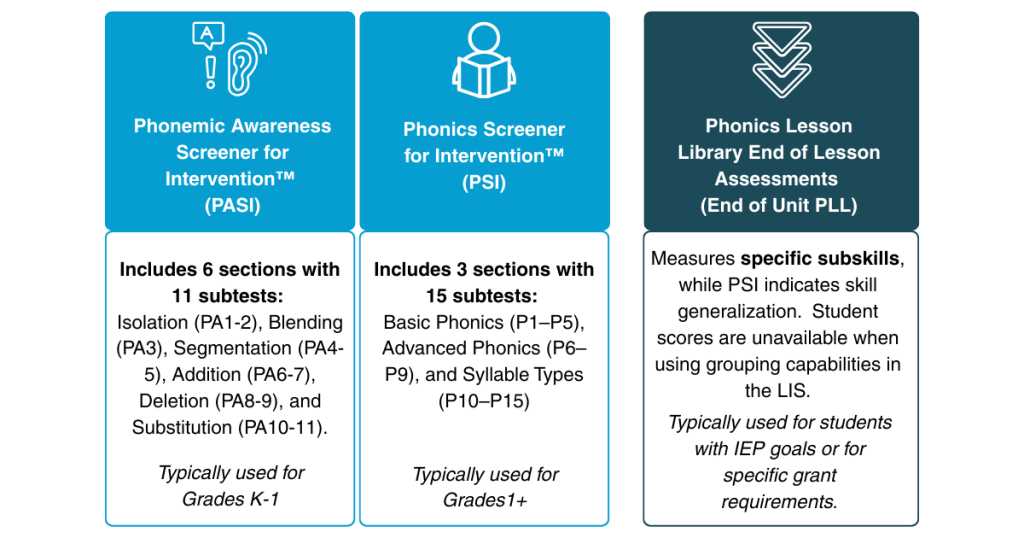
There are three digital assessments available in 95 Literacy Intervention System™ (95 LIS™):
- Phonemic Awareness Screener for Intervention™ (PASI)
- Phonics Screener for Intervention™ (PSI)
- Phonics Lesson Library™ (PLL) end-of-unit
The assessments are brief, individually administered, informal, and untimed, designed to identify skill deficits rather than measure fluency.
The two diagnostic assessments, PASI and PSI, are built on a structured literacy continuum progressing from phonological awareness to phonics, to gauge a student’s ability to generalize skills. Whereas the PLL end-of-unit assessments target specific subskills and are meant to be used selectively.
Assessing Digitally in 95 LIS (Strongly Recommended)
We recommend using the digital administration through the 95 LIS. This approach automatically captures and organizes all your student data, providing immediate access to student grouping and comprehensive reporting features – no additional work required on your end!
>>Administer Assessments Digitally: Get step-by-step instructions for assessing your students digitally.
>>Complete a Practice Digital Assessment: Practice using the digital assessment tools before using them with your students.
Assessing Paper/Pencil With the Student Booklet and Scoring Rubric
You have the option to print the student booklet and scoring rubric if you prefer the traditional paper-and-pencil approach.
Keep in mind that this method requires extra time for manual data entry afterward – you'll need to enter each student's results individually to unlock the automated grouping and reporting features.
>>Paper/Pencil Assessment Administration Guidance: Access step-by-step instructions for adding paper/pencil results into the 95 LIS.
>>For more detailed guidance on effectively administering assessments using the 95 LIS, check out the Assessment Administration article.
95 Percent Group Support is here to help! Contact us via the knowledge base support form.
To learn more about submitting tickets, reference our article on One95 Support.
Was this article helpful?
That’s Great!
Thank you for your feedback
Sorry! We couldn't be helpful
Thank you for your feedback
Feedback sent
We appreciate your effort and will try to fix the article